
 Join Slack
IP Address Management (IPAM)
Netris IPAM is the address-space source of truth every address-consuming object in Netris depends on: V-Net gateways and DHCP pools, NAT and L4 Load Balancer address pools, switch and SoftGate loopback and management IPs, and BGP route advertisement all draw from subnets created here first. Allocations and subnets are tracked per VPC in a nested, tree-like structure, and each subnet’s purpose and tenant determine which services are allowed to consume it.
Allocations and Subnets
There are 2 main types of IP prefixes - allocation and subnet. Allocations are IP ranges allocated to an organization via RIR/LIR or private IP ranges that are going to be used by the network. Subnets are prefixes which are going to be used in services.
An allocation never has a parent — creating an allocation inside another allocation is rejected. A subnet may sit under another subnet, to any depth: creating a 10.0.10.0/25 where a 10.0.10.0/24 subnet already exists files the /25 under the /24. The parent is never chosen — there is no parent selector. You enter a prefix, and the Controller places it under the containing allocation or subnet in that VPC.
Only top-level subnets are advertised upstream by SoftGate, so whether a subnet is nested under another subnet changes what leaves the fabric — see SoftGate HS.
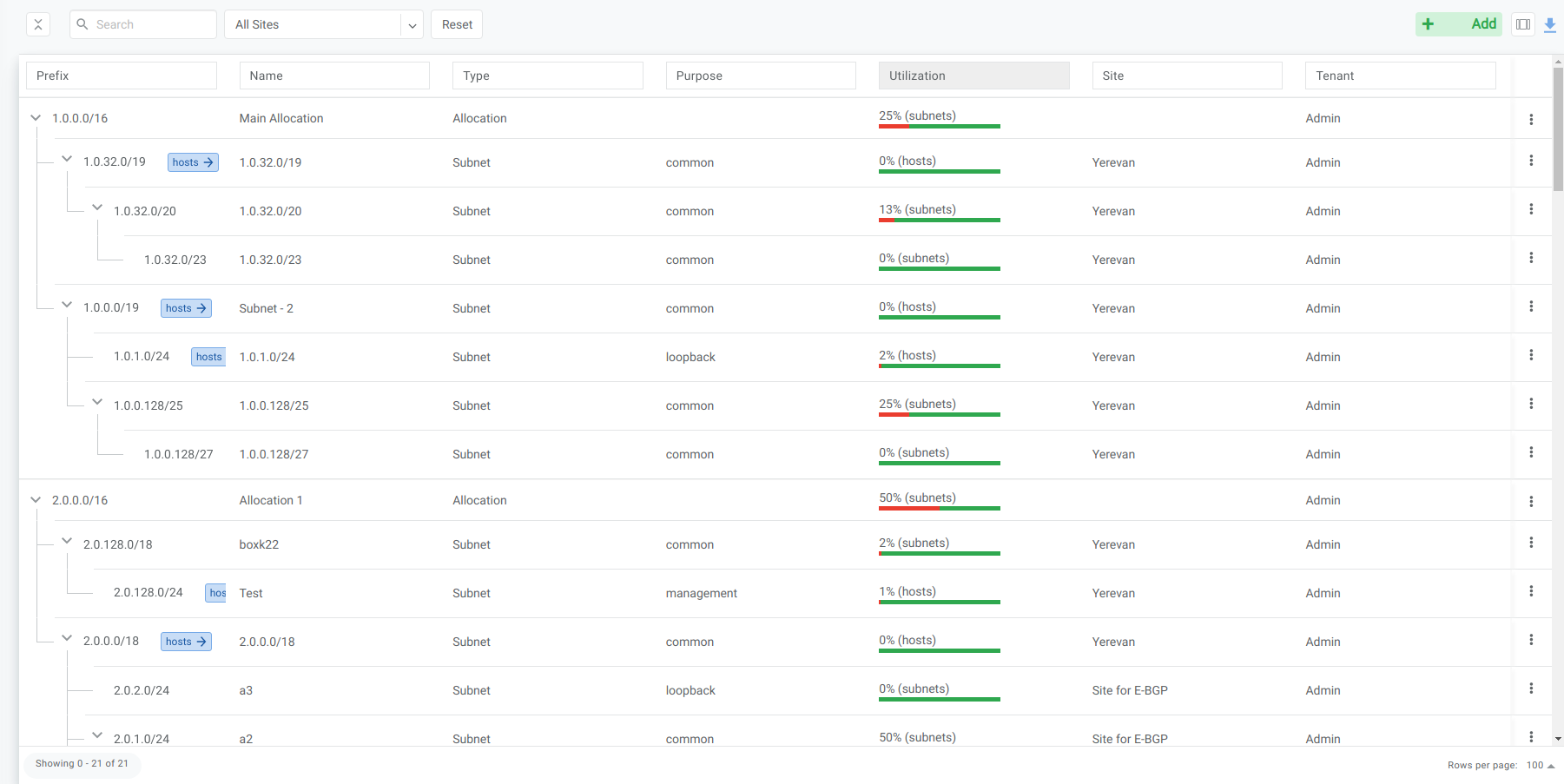
Figure: IPAM Tree View
Subnet purpose and service dependencies
Netris models address space first and consumes it second: you create an IPAM subnet with the right purpose before the service that will use it. A service only offers addresses from subnets whose purpose matches, so the IPAM entry is a prerequisite, not an afterthought.
Subnets — not allocations — are what render the network statements Netris uses for BGP route advertisement. To have a particular prefix or subprefix advertised, create a subnet for it — see BGP.
Purpose |
Required for |
Typical VPC |
|---|---|---|
|
A V-Net’s Layer-3 gateway (SVI), and the address pool DHCP hands out. For a multi-site V-Net, create the subnet and assign it to every site the V-Net spans before adding the gateway. |
Tenant VPC |
|
Loopback IPs for Netris hardware (switches, SoftGates). |
System VPC |
|
Out-of-band management IPs for switches and SoftGates; a management-purpose subnet also drives ZTP. (Since 4.9, management subnets can also be used in V-Nets and VPCs.) |
System VPC |
|
L4 Load Balancer frontend VIP pool. |
System VPC |
|
NAT public addresses (SNAT pools and DNAT targets). |
System VPC |
|
Nothing — reserve or document a prefix for future use. |
— |
See the V-Net, L4 Load Balancer, NAT, and DHCP and DHCP Relay pages for how each service consumes its subnet, and Netris VPC for why loopback, management, load-balancer, and nat subnets live in the System VPC.
Note
Purpose is necessary but not sufficient. A service also only offers subnets owned by its own Owner (Tenant). For a V-Net, the gateway subnet must have purpose common, be assigned to the V-Net’s Owner, and be available in a site the V-Net spans — see V-Net. An empty address picker with no error therefore has four possible causes: purpose, VPC, site, or tenant.
Add an Allocation
Navigate to Net→IPAM
Click the Add button
Select Allocation from the bottom select box
Fill in the rest of the fields based on the requirements listed below
Click the Add button
Name |
Unique name for current allocation. |
VPC |
The VPC the allocation belongs to. |
Prefix |
Unique prefix for the allocation, must not overlap with other allocations in the same VPC. Allocations may hold the same prefix in different VPCs — see Definitions. |
Tenant |
Owner of the allocation. Must be a tenant with access to the VPC — the VPC’s Admin Tenant or one of its Guest Tenants; any other tenant is rejected. |
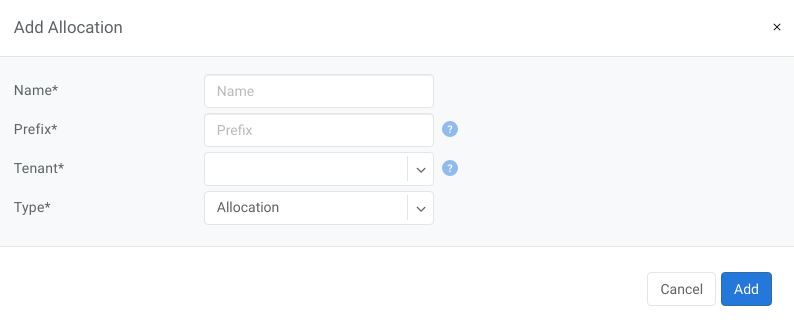
Add Allocation Window
Add a Subnet
Navigate to Net→IPAM
Click the Add button
Select Subnet from the bottom select box
Fill in the rest of the fields based on the requirements listed below
Click the Add button
Name |
Unique name for current subnet. |
VPC |
The VPC the subnet belongs to. Any VPC can be selected here, but only the VPC already carried by the parent allocation will be accepted — selecting any other VPC prevents the subnet from being created. |
Prefix |
Unique prefix for the subnet, must be included in one of the allocations. |
Sites |
One or more sites the subnet is assigned to. A subnet can be assigned to multiple sites — this is the mechanism for extending a V-Net across multiple locations; see V-Net. |
Tenant |
Owner of the subnet. Must be a tenant with access to the VPC — the VPC’s Admin Tenant or one of its Guest Tenants; any other tenant is rejected. It does not otherwise restrict who may carve subnets: any tenant with access to the VPC can create subnets under an allocation owned by a different tenant, and a child subnet need not share a tenant with its parent subnet or with the allocation — VPC is the only field that must match all the way down the tree. See Subnet purpose and service dependencies, above, for how a subnet’s Tenant gates which services can consume it. |
Purpose |
This field describes for what kind of services the current subnet can be used. It can have the following values:
|
Global Routing |
Checkbox. Controls whether this subnet is eligible to be advertised outside its own VPC — see Global Routing, below, for what it does and what’s still unconfirmed about it. |
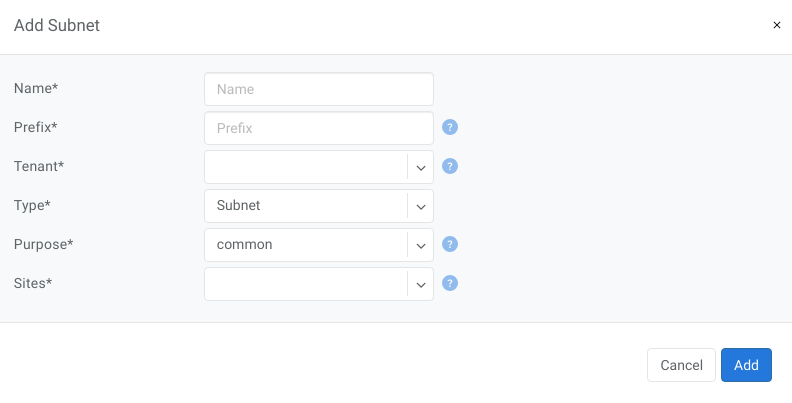
Figure: Add Subnet Window
Global Routing
Global Routing is a per-subnet checkbox, introduced in 4.4.0, that controls whether a subnet can be advertised outside the VPC/VRF it was created in. The in-product hint text reads:
Subnets with “Global Routing” enabled will be advertised from guest VPCs to the System VPC, and if the System VPC has upstream (Internet) connection such subnets will be advertised further upstream.
In other words: enabling it on a subnet in a tenant (guest) VPC makes that prefix a candidate for advertisement into the System VPC’s routing context, and from there further upstream if a SoftGate object in the System VPC carries an E-BGP session to the Internet or another external network — see BGP and the BGP route exchange between SoftGates, upstream routers, and downstream switches section of SoftGate HS for the mechanics of upstream advertisement itself.
This is the mechanism the 4.4.0 release notes refer to as “native VPC subnet reachability from outside of the Netris-managed fabric” — the subnet is advertised as-is, with no address translation. It is distinct from two other things that also move traffic between a VPC and the outside world:
A NAT rule’s global IP (see NAT) — a translated public address, not the subnet itself being advertised. Don’t confuse the two just because both use the word “global.”
VPC Connect — there, the eBGP peer relationship terminates directly on a switch port or V-Net SVI, does not involve a SoftGate, and the resulting traffic never passes through a SoftGate at all. Global Routing’s advertisement path, by contrast, always runs through a SoftGate-terminated eBGP session in the System VPC.
Default state: Global Routing is pre-checked automatically for any subnet created in the System VPC (VPC-1), regardless of Purpose — including loopback and management subnets. Whether that pre-checked state has any actual effect for those purposes is unconfirmed.
Tip
IPAM does not track point-to-point link addressing. Underlay BGP-numbered links and L3VPN per-port links are configured directly on the Link object in Topology Manager instead — see Topology Management, Inventory Profiles, and Server Cluster. Netris can auto-allocate them, or an operator can enter them manually; L3VPN link addresses are typically pre-populated with Terraform during server onboarding.